
If you send one-time passwords by SMS to Indian mobile numbers, every message has to match a record on a DLT (Distributed Ledger Technology) platform before the operator will deliver it. That surprises many teams who are used to sending SMS in other countries with nothing more than an API key.
This guide walks through DLT registration for OTP SMS step by step: what you register, what each item looks like for an OTP use case, the mistakes that get templates rejected, and how to keep sending OTPs while you wait for approval.
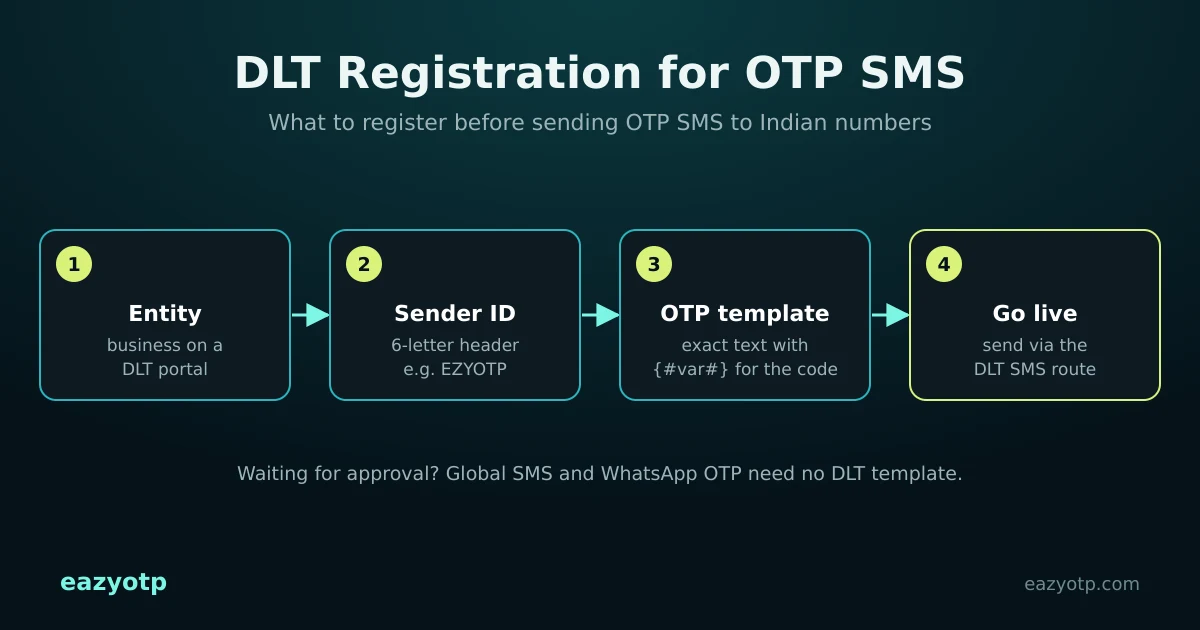
What DLT is, in one paragraph
DLT is the registration system Indian telecom operators run under TRAI’s commercial communication rules (TCCCPR 2018). Businesses that send SMS, called principal entities, register themselves, their sender IDs (also called headers) and their message templates. When an SMS is sent, the operator checks it against these records. If the sender ID or the text does not match an approved record, the message is blocked.
What you register for OTP SMS
| Item | What it is | For OTP messages |
|---|---|---|
| Principal entity | Your business, verified with documents | Registered once, shared across operators |
| Sender ID (header) | The name shown as the sender | Six letters for service messages, for example ACMEIN |
| Content template | The exact message text with variables | Service Implicit (Transactional for banks), the code as {#var#} |
| Consent template | Proof that users agreed to receive messages | Not needed for OTPs a user requests themselves |
Before you start: keep these ready
- Your business PAN
- Proof of business registration, such as a GST certificate or certificate of incorporation
- A letter of authorisation for the person registering (the portal provides its own format)
- The email address and mobile number of that person
- The brand name you want customers to see in the sender ID and in the message
Exact document lists differ slightly between operator portals, so check the list on the portal you choose before you begin.
Step 1: Register your business as a principal entity
Choose one operator’s DLT portal (Jio, Airtel, Vi and BSNL each run one), create an account and submit your business details and documents. After approval you receive an Entity ID. You only do this once: other operators can see the same registration.
Step 2: Register a sender ID for OTPs
Request a header for service messages. It is made of six alphabetic characters and should clearly relate to your brand. ACMEIN for a company called Acme is fine; a random string or someone else’s brand will be rejected. Users trust an OTP more when the sender name matches the app they are logging in to.
Step 3: Register your OTP content template
Templates contain the fixed text plus variables written as {#var#}. For an OTP, the code is the variable. Choose the Service Implicit category unless you are a bank or regulated financial institution, which can use Transactional.
A template that is usually approved looks like this:
{#var#} is your OTP to log in to Acme. It is valid for 10 minutes. Do not share it with anyone. - AcmeTips for OTP templates:
- Name your business in the text.
- Use as few variables as possible, ideally only the code.
- Keep promotional wording, offers and emojis out of OTP templates.
- If the template contains a link, the link must also be whitelisted on the DLT portal. TRAI rules now block SMS with unregistered URLs.
- Register separate templates if you send OTPs for different purposes, such as login and payment confirmation.
Step 4: Connect your SMS provider
Your messages reach operators through a messaging provider. Under TRAI’s message traceability rules, the chain of providers that carries your traffic is declared on the DLT portal. Your SMS provider gives you the details to add. On EazyOTP, contact our team to activate the SMS DLT Eazy OTP route on your account and connect your approved DLT details.
Step 5: Test, then go live
Send a test OTP to your own phone from the sandbox in your dashboard, which sends to one mobile number, and check that the sender ID and text appear exactly as registered. With EazyOTP each OTP is one GET request with the user’s number. The platform generates the code and returns it to your server for verification. See the ready-to-use OTP API for the request and response.
Why DLT templates get rejected
- Sender ID doesn’t match the brand in your entity registration or in the message.
- Wrong category, such as an OTP filed as Promotional.
- Generic text with no business name.
- Too many variables, or a variable where fixed text is expected.
- Promotional wording in a service template.
- Unwhitelisted links in the message.
How long does DLT approval take?
It depends on the operator and on how complete your documents are. Entity, header and template approvals happen one after the other, so plan for several working days from start to finish, and longer if anything is sent back for correction.
Need OTPs before your DLT approval comes through?
You don’t have to delay your launch. On EazyOTP:
- The Global SMS route delivers OTPs to Indian numbers without a DLT template or sender ID. See instant SMS OTP India.
- WhatsApp OTP uses pre-approved WhatsApp authentication templates instead of DLT. See the WhatsApp OTP API for India.
- Once DLT is approved, move domestic SMS to the DLT route. The API request stays the same; only the endpoint changes.
For an overview of every SMS option, read SMS OTP services in India. If you are still choosing a provider, our guide to picking an OTP SMS service provider in India covers what to ask.
Frequently asked questions
Do I need DLT registration to send OTP SMS in India?
Yes, if you send SMS to Indian numbers over domestic routes. Your business, sender ID and OTP message template must be registered on an operator DLT platform. Messages to numbers outside India do not use DLT.
Which DLT template category is used for OTP messages?
OTP templates are normally registered as Service Implicit content. Banks and other regulated financial institutions may register OTPs as Transactional. The DLT portal shows the categories available to your entity type.
Do I have to register on every operator’s DLT portal?
No. Register your entity on one operator’s DLT platform. The registration is shared with the other operators.
Can I send OTPs while my DLT approval is pending?
Yes, with EazyOTP. The Global SMS route can deliver OTPs to Indian numbers without a DLT template or sender ID, and WhatsApp OTP uses Meta-approved authentication templates instead of DLT. Read instant SMS OTP India.
Does my OTP template need my brand name?
It should. Templates that name your business are clearer for users and are less likely to be rejected than generic text such as “Your code is {#var#}”.
Send OTPs today, add DLT when it’s ready
Create your account, test in the sandbox and start on Global SMS or WhatsApp while your DLT approval is pending.
Prefer chat? Message EazyOTP on WhatsApp