Reaches users where they already are
The code arrives in WhatsApp, the app your users already have open. They do not need to search through their SMS inbox for it.

Send one-time passwords to your users on WhatsApp with one API request. Verify sign-ups, logins, and payments on the messaging app most Indian smartphone users open every day.
Jump to: API request · Setup steps · WhatsApp vs SMS · FAQ · WhatsApp vs SMS cost · WhatsApp OTP rates · Chat with us
Last updated:
WhatsApp OTP sends the same one-time password you would send by SMS, but delivers it inside WhatsApp as an authentication message.
The code arrives in WhatsApp, the app your users already have open. They do not need to search through their SMS inbox for it.
WhatsApp authentication messages use templates approved by Meta, not TRAI DLT SMS templates. This is a separate approval path from domestic SMS.
Set a webhook in PingToChat and get Sent, Delivered and Read status updates for your WhatsApp messages at your callback URL.
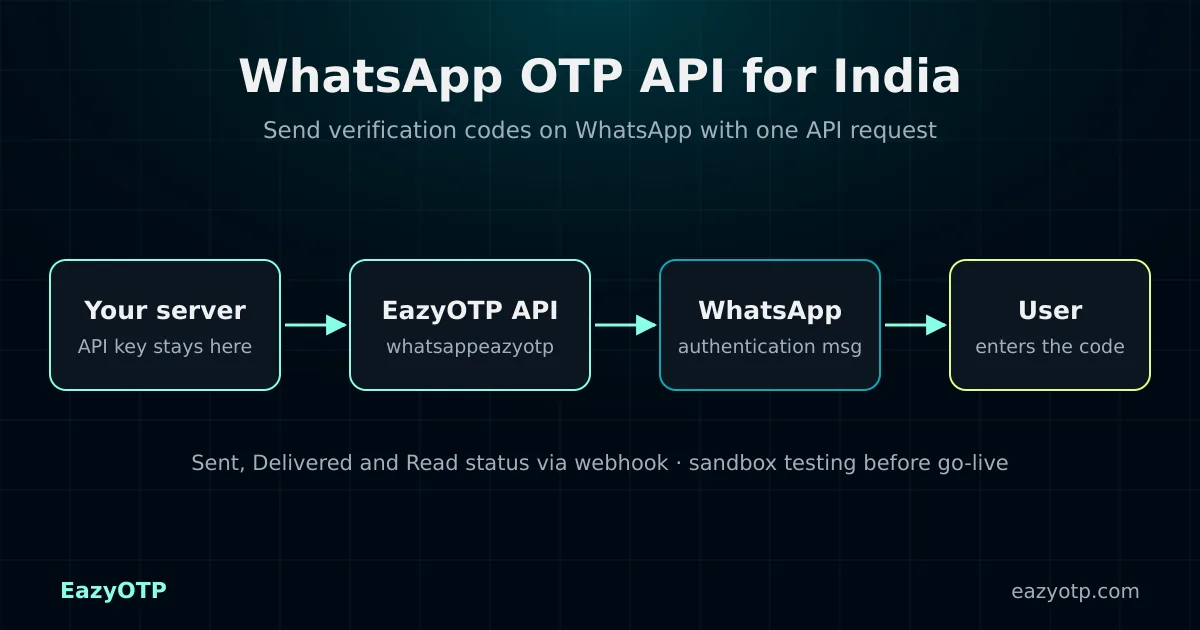
Call the WhatsApp Eazy OTP endpoint with the user’s number in international format. EazyOTP generates the OTP, sends it on WhatsApp, and returns a track_id and the OTP to your server.
Your API key is part of the request URL, so always call the API from your backend, never from the browser or app JavaScript.
Request (from your server)
GET https://app.pingtochat.com/api/v1.0/{YOUR_API_KEY}/whatsappeazyotp?number=91XXXXXXXXXXSuccess response (example)
{
  "status": "success",
  "message": "WhatsApp OTP Sent Successfully",
  "track_id": "76B9FBQR3",
  "recipients": [
    { "mobile_number": "91XXXXXXXXXX", "status": "sent" }
  ],
  "otp": "392605"
}Most of the setup happens in your PingToChat account. You only write the code for the API call and the code check.
Create your accountSign up at app.pingtochat.com. EazyOTP runs on the PingToChat messaging platform.
Activate the WhatsApp Eazy OTP service in your account. Contact us if you need help.
Send sandbox OTP messages to one test number from the dashboard and check that they arrive.
Request whatsappeazyotp with the user’s number. Then save the returned OTP on your server with an expiry, for example, five minutes.
Compare the code the user types with the stored code. Use webhooks to track whether each message was sent, delivered, and read.
Many teams send OTPs on WhatsApp first and keep SMS for users who are not on WhatsApp.
| WhatsApp OTP | SMS OTP | |
|---|---|---|
| Needs mobile data | Yes | No |
| Works on feature phones | No | Yes |
| Template approval | Meta authentication template | TRAI DLT for the domestic route; none on your side for the Global SMS route |
| Delivery status | Sent, delivered, and read via webhook | Send status in the API response |
| EazyOTP endpoint | whatsappeazyotp |
smseazyotp (DLT) or globalsmseazyotp |
Need both? See multi-channel OTP fallback for falling back from WhatsApp to SMS. For SMS without DLT paperwork on your side, see instant SMS OTP for India.
Create an account and send a WhatsApp OTP from the sandbox in a few minutes. Questions about templates or pricing? We reply on WhatsApp.
Confirm that a phone number belongs to the user during registration and passwordless login.
Ask for a code before payouts, password resets, or changes to bank or contact details.
Confirm cash-on-delivery orders and deliveries with a code, which helps reduce fake orders.
Can’t find your answer? Contact our team or read the EazyOTP API documentation.
A WhatsApp OTP API lets your backend send a one-time password to a user’s WhatsApp number with a single API request. EazyOTP generates the code, delivers it through a WhatsApp authentication message, and returns the result to your server.
Yes. The number must be registered on WhatsApp. For users who do not use WhatsApp, send the code by SMS instead. See multi-channel OTP fallback for how to combine both channels.
TRAI DLT registration applies to SMS. WhatsApp authentication messages use message templates approved by Meta, not DLT SMS templates. If you also send SMS OTPs on the domestic route, those still need DLT registration.
Yes. After the service is activated on your PingToChat account, you can send sandbox OTP messages to one test number from the dashboard before you switch on live traffic.
The success response includes the OTP that was sent. Store it on your server (preferably hashed) with a short expiry, compare it with what the user types, and never send it to the browser.
You pay per OTP message, and the rate depends on the destination country and channel. See OTP pricing or contact our team for volume pricing.
Create your PingToChat account, test in the sandbox, and connect the WhatsApp OTP API to your app.
Already have an account? Log in to PingToChat