WhatsApp OTP
Delivered as a WhatsApp authentication message, with Sent, Delivered, and Read status by webhook. Endpoint: whatsappeazyotp.

Send OTPs on WhatsApp, Global SMS and DLT SMS from one EazyOTP account. You choose the order: try WhatsApp first, and switch to SMS when a user cannot receive it.
Last updated:
All three channels use the same request pattern, so adding a second channel is a small change.
Delivered as a WhatsApp authentication message, with Sent, Delivered, and Read status by webhook. Endpoint: whatsappeazyotp.
International SMS routes to users worldwide, including India, with no DLT template or sender ID approval. Endpoint: globalsmseazyotp.
Domestic SMS with your approved sender ID and DLT template, for steady Indian traffic. Endpoint: smseazyotp.
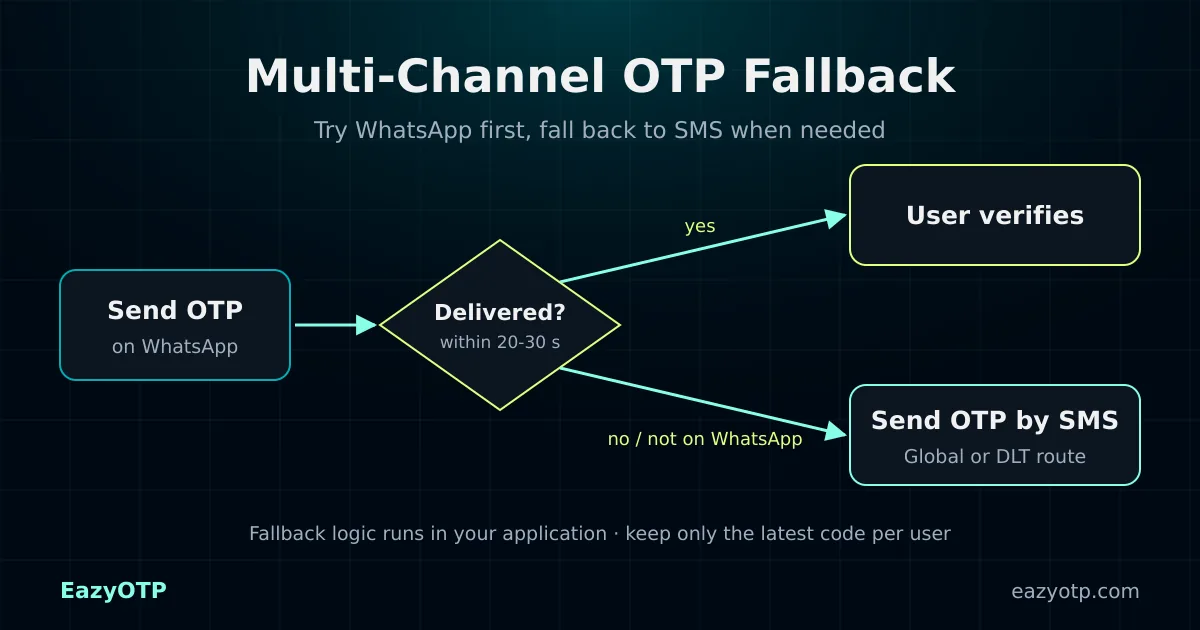
Fallback runs in your application. EazyOTP provides the channels and the delivery signals, and your backend decides when to switch.
If the WhatsApp request returns an error, for example, “Invalid WhatsApp number”, send the code by SMS straight away.
Watch the webhook for a Delivered status. If none arrives within your time limit, send the OTP by SMS.
After 20 to 30 seconds, show a “Didn’t get it? Send by SMS” button. The user chooses, which keeps duplicate sends low.
This example uses only the documented EazyOTP endpoints. Add the headers shown in the API documentation, plus your own rate limits and code storage.
Node.js (server-side)
// Runs on your server. Never expose the API key in the browser.
const BASE = `https://app.pingtochat.com/api/v1.0/${process.env.EAZYOTP_API_KEY}`;

async function send(endpoint, number) {
  const res = await fetch(`${BASE}/${endpoint}?number=${number}`);
  return res.json();
}

async function sendOtp(number) {
  // 1. Try WhatsApp first
  const wa = await send('whatsappeazyotp', number);
  if (wa.status === 'success') return { channel: 'whatsapp', ...wa };

  // 2. Not on WhatsApp or not delivered: fall back to SMS
  const sms = await send('globalsmseazyotp', number); // or 'smseazyotp' with DLT
  return { channel: 'sms', ...sms };
}
// Save only the latest OTP for each user (hashed, with an expiry), then verify.Fallback improves delivery, but every extra send costs money and adds risk. Keep it controlled.
Compare channel pricingtrack_id and channel for every send so you can audit deliveryCan’t find your answer? Contact our team or read the EazyOTP API documentation.
Your application controls fallback. EazyOTP gives you WhatsApp, Global SMS and DLT SMS endpoints, plus send results and delivery webhooks. Your backend decides when to try the next channel. Our team can help you design the flow.
A common order is WhatsApp first, then SMS. For SMS, use the DLT route if your templates are approved, or the Global SMS route if not. Users without WhatsApp go straight to SMS.
Each OTP message is charged at the rate for its channel and country. If the first attempt is sent and you also send an SMS, both are billed. A short wait before fallback, or a user-tapped resend, keeps duplicate sends low.
Each send creates a new OTP. Store only the latest code for each user and expire the earlier one, so the user always enters the newest code.
Many teams wait 20 to 30 seconds, or show a “Send by SMS instead” button after that delay. Fall back immediately when the WhatsApp request fails, for example because the number is not on WhatsApp.
Yes. The WhatsApp and Global SMS endpoints accept international numbers, so the same fallback logic works in every country you serve.
Create your account, activate WhatsApp and SMS Eazy OTP and build fallback into your verification flow.
Already have an account? Log in to PingToChat