You send a phone number
The only request parameter is numberthe recipient in international format, for example 91XXXXXXXXXX.

Send one API request with a phone number. EazyOTP generates the one-time password, puts it into a pre-approved message, and delivers it on WhatsApp or SMS. You don’t need your own OTP generator, message template, or messaging provider.
Last updated:
A ready-to-use OTP API takes care of the parts of phone verification that are the same for every business: creating the code, putting it into a compliant message, and delivering it. Your application asks for an OTP and checks the answer.
The only request parameter is numberthe recipient in international format, for example 91XXXXXXXXXX.
EazyOTP generates the OTP, inserts it into an approved template and delivers it on the channel you call.
The response contains a status, a track_id for tracking and the otp that was sent, so your backend can verify the user.
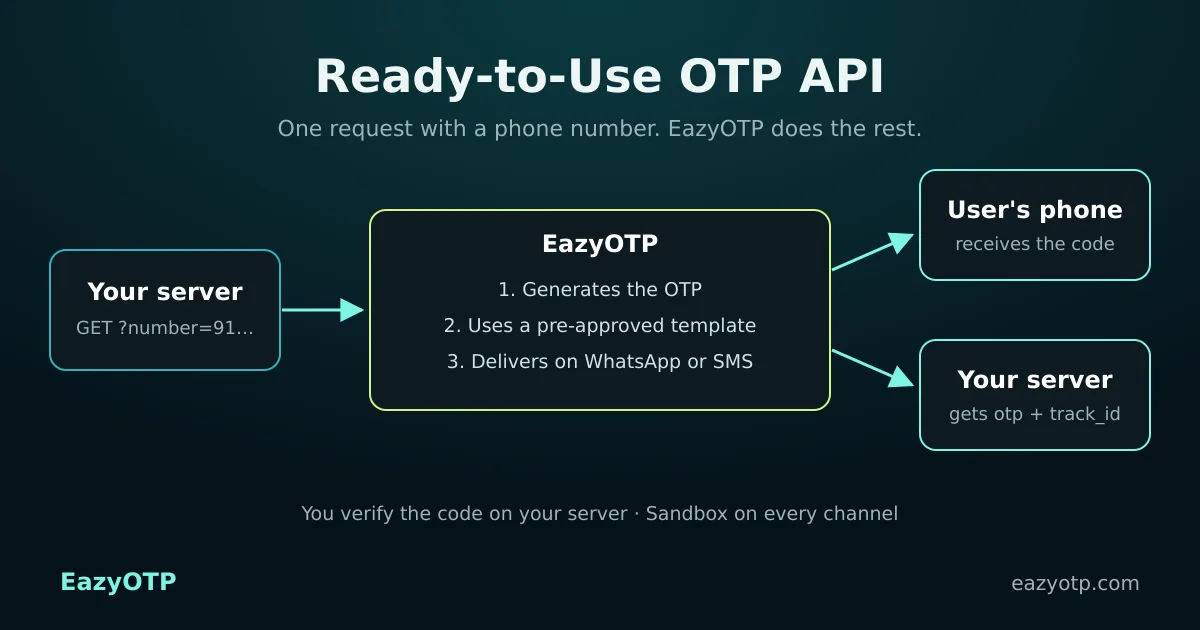
With a general messaging API, you build the OTP feature yourself. With EazyOTP, the messaging side is already set up.
| Task | Traditional OTP setup | EazyOTP |
|---|---|---|
| Generate the OTP | Write and secure your own code generator | Generated by EazyOTP and returned in the response |
| Message template | Write the OTP message and get it approved for each channel | Pre-approved templates on WhatsApp and Global SMS. DLT SMS uses your approved DLT template |
| Template IDs and variables | Store template IDs and map the OTP into variables | Not needed: one endpoint per channel |
| Messaging provider | Sign up for and integrate one provider per channel | One account for WhatsApp, Global SMS and DLT SMS |
| API request | Send template ID, variables, sender, and recipient | Send the recipient number only |
| Testing | Often needs a live account and approved templates | Sandbox in the dashboard for one test number |
| Verification, expiry and retries | Your application | Still your application (see below) |
Whether you need a template of your own depends on the channel and on the rules that apply to it.
No template to write. WhatsApp Eazy OTP sends codes with WhatsApp Business API pre-approved authentication templates, for example: “Your verification code is {{1}}. This code is valid for 5 minutes. Do not share this OTP with anyone.”
WhatsApp OTP API →No DLT template or sender ID approval. The Global SMS route reaches users worldwide, including India, without the DLT approval process.
International SMS OTP gateway →DLT approval required. Indian telecom rules require DLT registration, an approved sender ID, and an approved template on the domestic route. Many teams start on Global SMS while DLT approval is pending.
Start today, add DLT later →Each channel has its own endpoint, and all three work the same way: a GET request from your server with the recipient’s number. Your API key is part of the URL, so always call the API from your backend, never from browser or app code.
Channel endpoints: whatsappeazyotp, globalsmseazyotp and smseazyotp.
Request (curl, from your server)
curl --location 'https://app.pingtochat.com/api/v1.0/{YOUR_API_KEY}/whatsappeazyotp?number=91XXXXXXXXXX' \
  --header 'Content-Type: application/json' \
  --header 'Authorization: Bearer {YOUR_TOKEN}'
Success response (from the documentation)
{
  "status": "success",
  "message": "WhatsApp OTP Sent Successfully",
  "track_id": "WA76B9FBQR3",
  "recipients": [
    {
      "mobile_number": "91xxxxxxxxxx",
      "status": "sent",
      "error_code": null,
      "error_description": null,
      "time": "2026-01-08 14:15:22"
    }
  ],
  "otp": "748219"
}
Error response (from the documentation)
{
  "status": "error",
  "message": "Invalid WhatsApp number or service not activated"
}A ready-to-use API removes the messaging work, not your security work. This is the split between EazyOTP and your application.
Add WhatsApp-to-SMS fallback| EazyOTP | Your application | |
|---|---|---|
| OTP code | Generates it | Stores it securely |
| Message and template | Pre-approved template (WhatsApp, Global SMS) | DLT registration for the India DLT route |
| Delivery | Sends it on the channel you call | Chooses the channel and any fallback |
| Status | API response and Sent/Delivered/Read webhooks | Logs the track_id |
| Verification | — | Compares the code, expiry, attempt limits |
| Abuse protection | — | Rate limits, CAPTCHA, resend limits |
The API returns the code it sent, so verification happens in your backend. Follow these rules:
This is example code for your own server. The EazyOTP parts are the documented request and response fields.
PHP (your backend)
<?php
// 1. Send: call EazyOTP from your server (never from the browser)
$url = "https://app.pingtochat.com/api/v1.0/{$apiKey}/whatsappeazyotp?number=" . urlencode($number);
$ch  = curl_init($url);
curl_setopt_array($ch, [
    CURLOPT_RETURNTRANSFER => true,
    CURLOPT_HTTPHEADER     => ['Content-Type: application/json', "Authorization: Bearer {$token}"],
]);
$res = json_decode(curl_exec($ch), true);

if (($res['status'] ?? '') === 'success') {
    // 2. Store only a hash of the code, with a short expiry
    $_SESSION['otp'] = [
        'hash'     => password_hash($res['otp'], PASSWORD_DEFAULT),
        'expires'  => time() + 300,
        'attempts' => 0,
        'track_id' => $res['track_id'],
    ];
}

// 3. Verify: compare what the user typed, on the server
function verify_otp(string $typed): bool {
    $o = $_SESSION['otp'] ?? null;
    if (!$o || time() > $o['expires'] || ++$_SESSION['otp']['attempts'] > 5) return false;
    if (!password_verify($typed, $o['hash'])) return false;
    unset($_SESSION['otp']); // one-time use
    return true;
}Setup takes place in your PingToChat account, the platform EazyOTP runs on. The only code you write is the API call and the code check.
Create free accountRegister at app.pingtochat.com.
Every service must be activated before use: WhatsApp Eazy OTP, SMS Global Eazy OTP or SMS DLT Eazy OTP. Contact us to activate.
Go to Services, choose the channel, and open Eazy OTP (Sandbox). Send test OTPs to one mobile number.
Send the documented GET request with the user’s number and store the returned OTP securely.
Check the user’s code on your server, and set a webhook under Settings → API → Webhook to receive delivery status.
Add phone verification to sign-up or login with one HTTP call and a code check, without learning template systems.
Launch without registering your own WhatsApp templates. Start on Global SMS while your DLT approval is pending.
Use the same request style for Indian and international users, on WhatsApp or Global SMS.
Can’t find your answer? Contact our team or read the EazyOTP API documentation.
A ready-to-use OTP API is a verification service where the provider generates the one-time password, formats it into an approved message and delivers it. You send one API request with the user’s phone number. You do not build the OTP generator, write the message text or connect your own messaging provider.
Yes, on two of the three channels. WhatsApp Eazy OTP sends codes with pre-approved WhatsApp authentication templates, and the Global SMS route needs no DLT template or sender ID approval. The India DLT SMS route is different: telecom rules require DLT registration, an approved sender ID and an approved template before live traffic.
EazyOTP does. Your request contains only the recipient’s number. EazyOTP generates the code, sends it and returns it to your server in the otp field of the API response.
In your own backend. Save the OTP from the API response on your server (ideally hashed) with a short expiry, then compare it with the code the user types. Never send the OTP to the browser or app, and limit how many attempts each user gets.
Three: WhatsApp OTP (whatsappeazyotp), Global SMS OTP for international numbers (globalsmseazyotp) and India DLT SMS OTP (smseazyotp). Each channel must be activated on your account before use.
Yes. Every channel has a sandbox in the dashboard where you can send test OTPs to one mobile number before you enable live traffic.
You pay per OTP message, and the rate depends on the channel and the destination country. See OTP pricing for current rates, or contact our team for volume pricing.
Create your account, activate a channel and send a sandbox OTP to your own phone in minutes.
Already have an account? Log in to PingToChat